


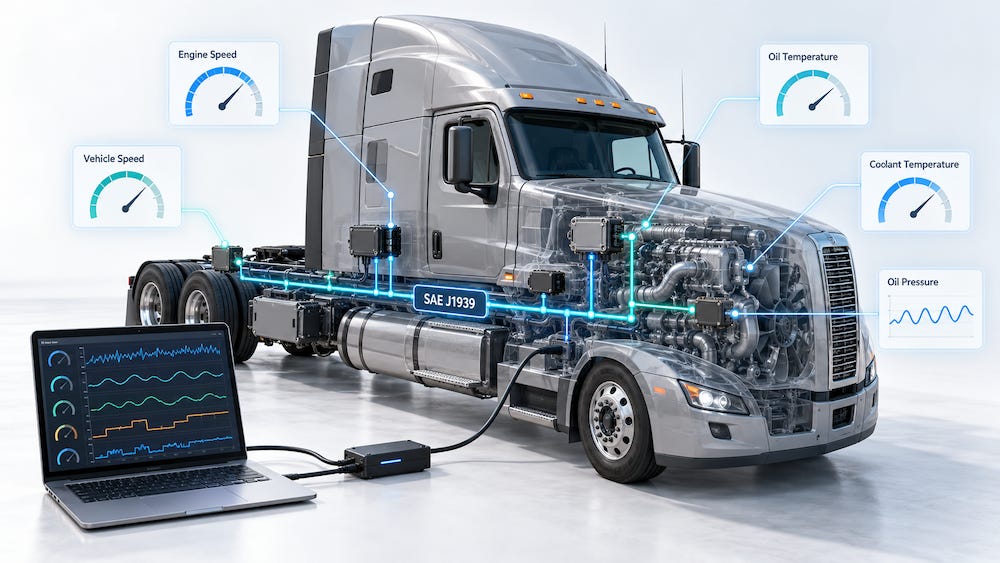
Developing an SAE J1939 application does not always require access to a truck or a running diesel engine. For many development tasks, what matters is receiving the messages that an engine controller and other electronic control units would normally transmit. A simulator can provide that traffic on a workbench, allowing developers to test their software under controlled and repeatable conditions.
Consider a dashboard that displays engine speed, coolant temperature, and oil pressure. Before connecting it to a vehicle, you need to determine whether it interprets the incoming data correctly. Does the tachometer show the expected speed? Does the temperature display use the correct units? Does a warning appear when oil pressure falls below the configured threshold? Simulated messages let you investigate these questions by choosing the values yourself.
The same approach is useful for testing gateways, recording devices, and remote monitoring systems. It also provides an accessible way to learn J1939: instead of trying to understand everything happening on a busy vehicle network, you can begin with a few known messages.
Signals, SPNs, and PGNs
Before configuring a simulation, it helps to distinguish between an individual parameter and the message that carries it.
An SPN, or Suspect Parameter Number, identifies a parameter such as engine speed. A PGN, or Parameter Group Number, identifies a parameter group that can contain several related parameters. Consequently, simulating three signals does not necessarily require transmitting three separate messages.
The transmitted data must also use the correct encoding. A physical value, such as a temperature or rotational speed, usually needs to be converted into a numerical representation using the specified resolution and offset. Its position and length within the message matter just as much as its value.
The SAE J1939 Digital Annex provides the PGN and SPN definitions needed for this work, including data lengths, units, resolutions, offsets, and transmission information.
Choosing What to Simulate
A useful simulation begins with the requirements of the receiving device. There is little benefit in generating a large collection of messages if the application only uses a handful of parameters.
For an initial dashboard test, engine speed, coolant temperature, and oil pressure may be sufficient. A vehicle monitoring application might additionally require road speed, fuel level, fuel consumption information, and vehicle position. Identification and maintenance functions may depend on information such as the vehicle identification number and accumulated engine operating hours.
Start with fixed values. These make it easy to compare the transmitted data with the receiving device’s output. Once the basic interpretation is correct, introduce changing values and more demanding conditions.
For example, you could gradually increase engine speed, raise coolant temperature toward a warning threshold, or interrupt a message to examine how the application handles missing data. Each test should answer a specific question about the receiving system.
Message Timing and Requests
Correct values are only part of a useful simulation. Message timing also affects how the receiving application behaves.
A display may interpret a missing periodic message as a communication failure. A gateway may update its output only when new data arrives. If the simulator transmits everything at an arbitrary rate, the test may overlook problems that appear under the expected operating conditions.
Request handling deserves separate attention. When an application requests a particular parameter group, the simulator must recognize that request and provide the appropriate response. Periodically broadcasting the same information may allow a display to show a value, but it does not verify the application’s request-and-response behavior.
For each required parameter group, establish how it should be transmitted and what behavior the application expects.
A Practical JCOM1939 Example
In my original diesel engine simulation project, I used a JCOM1939 USB interface together with the Windows-based JCOM1939 Monitor software. The configuration included common engine and vehicle parameters, along with information made available in response to requests.

The interface provided J1939 address claiming and transport protocol support, while the software allowed the simulation messages to be configured and saved.
This division is useful because ECU simulation involves more than repeatedly transmitting CAN frames. Address claiming establishes the simulated node’s network identity. Transport protocol support handles parameter groups whose payload exceeds the eight-byte capacity of a Classical CAN data frame.
When selecting a simulator, check these capabilities against your application. A tool that can transmit individual frames may be sufficient for a basic display test, while a more complete ECU simulation requires additional protocol behavior.
Building a Repeatable Test
Keep a record of each simulation configuration, including the transmitted values, message timing, source addresses, and expected results. A saved configuration becomes especially valuable when you need to repeat a test after changing software or replacing hardware.
It is also helpful to monitor the bus independently. Comparing the actual transmitted traffic with the receiving application’s output makes it easier to determine whether a problem originates in the simulation or in the device being tested.
Begin with a small, understandable setup, then add complexity as each function is verified. The objective is to create predictable conditions that reveal how your application behaves.
Diesel Truck Signal Simulation
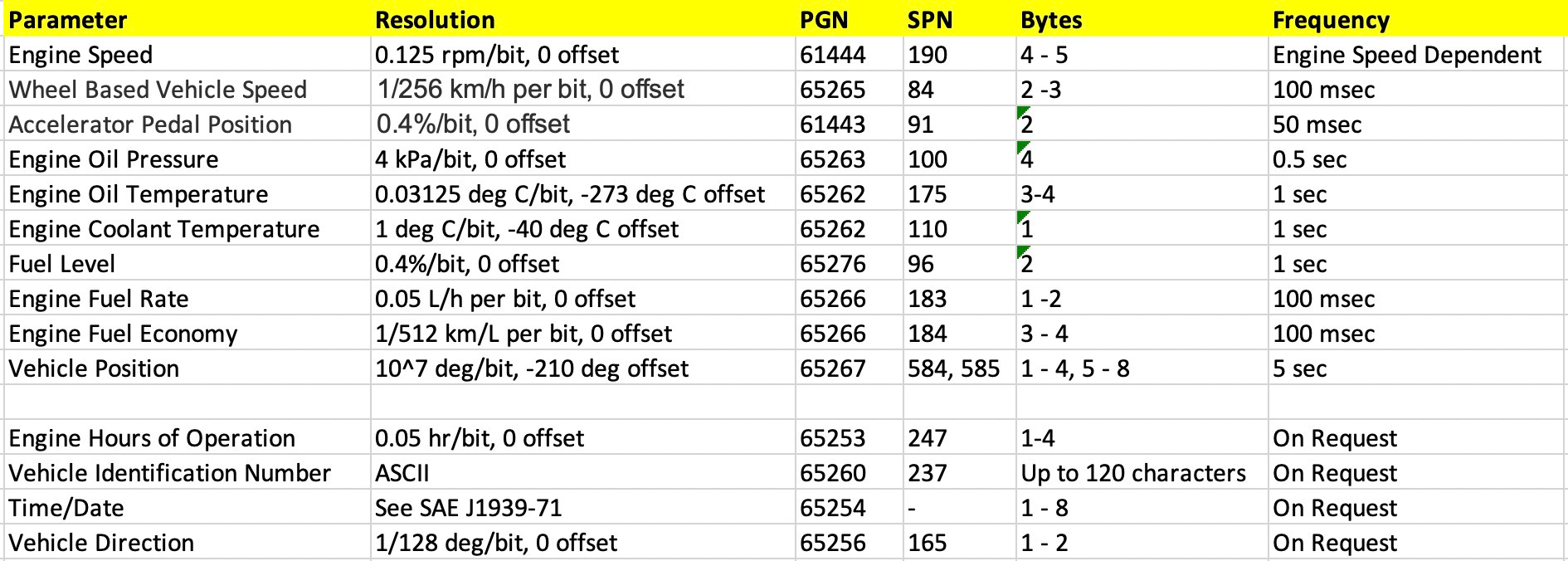
In order to simulate some frequently used SAE J1939 signals, we have chosen the following parameters:
Engine Speed
Wheel Based Vehicle Speed
Accelerator Pedal Position
Engine Oil Pressure
Engine Oil Temperature
Engine Coolant Temperature
Fuel Level
Engine Fuel Rate
Engine Fuel Economy
Vehicle Position (GPS)
All of the above parameters are transmitted automatically using their corresponding frequencies. The following signals are available on request, a modus that is also supported by our simulator board.
Engine Hours of Operation
Vehicle Identification Number (VIN)
Time/Date
Vehicle Direction
The image below lists these parameters including their definition (PGN, SPN, frequency, etc.):
The following image demonstrates how these signals have been entered (and saved to a file) using the jCOM1939 Monitor Software:
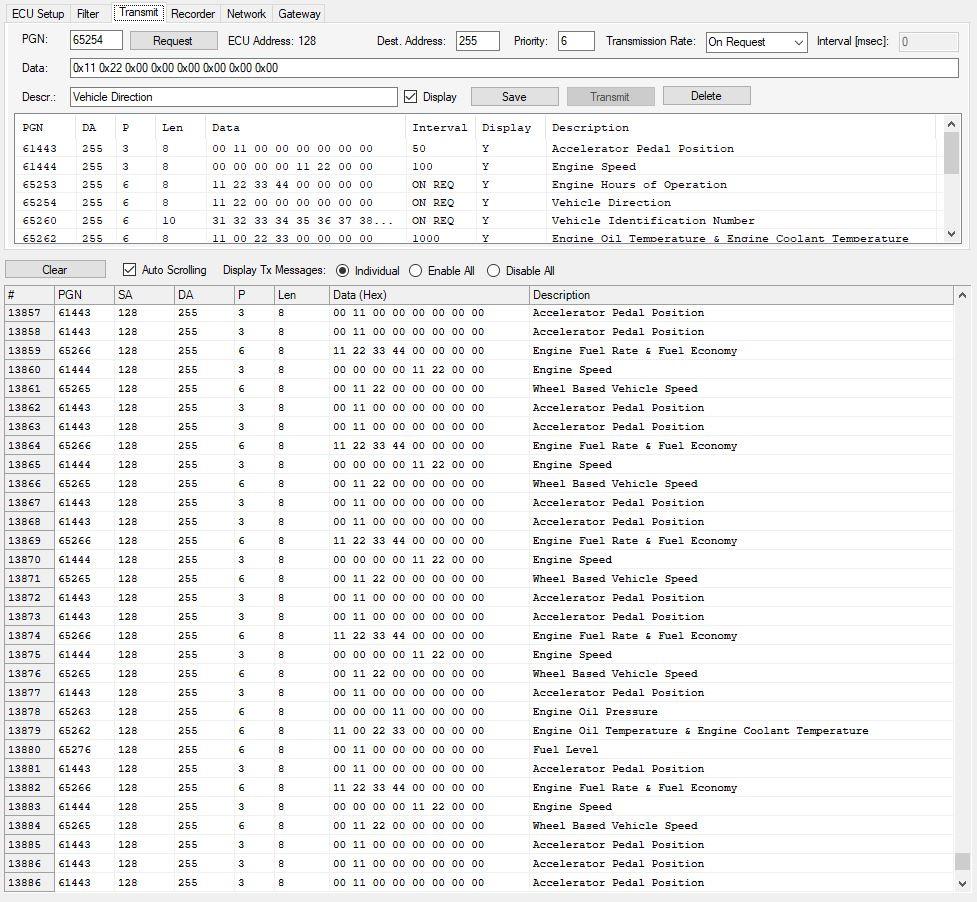
All signals are transmitted into an SAE J1939 vehicle network and displayed on the screen in order of appearance.
What the Results Tell You
A successful bench test demonstrates that the application handles the simulated traffic as expected. Its value depends on how well that traffic represents the intended vehicle or machine.
Fixed values can verify decoding. Changing values can exercise display updates and application logic. Deliberately interrupted messages can test timeout handling. More coordinated scenarios can examine how the application responds when several operating conditions change together.
Final testing on the intended equipment remains necessary. Real networks introduce additional traffic, manufacturer-specific behavior, electrical conditions, and interactions between controllers. A simulator helps you resolve many basic problems before reaching that stage—and makes those problems easier to reproduce when they occur.