


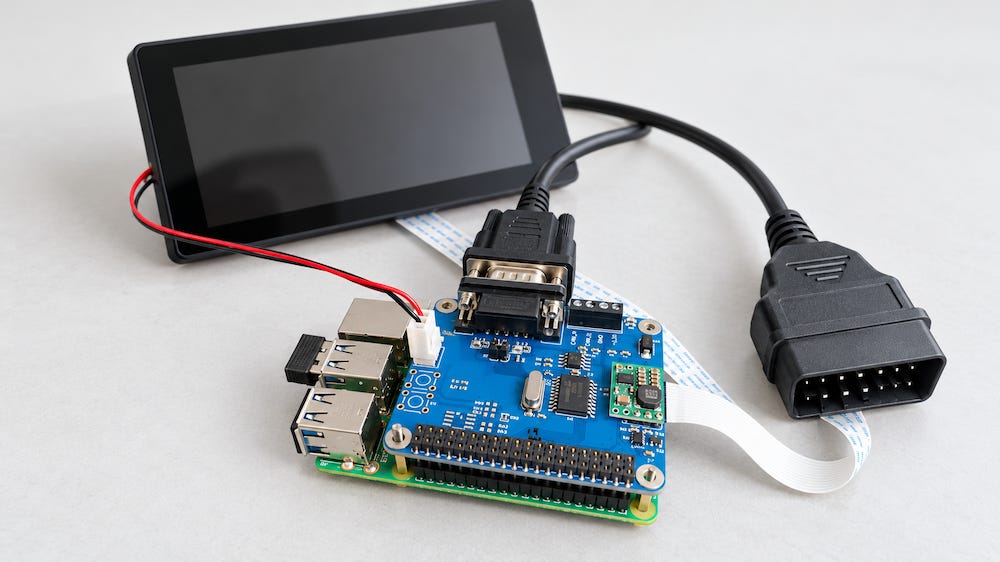
A Raspberry Pi equipped with a PiCAN2 CAN Bus interface provides a useful platform for exploring vehicle diagnostics and recording CAN traffic. However, connecting the hardware to a vehicle’s OBD-II port is only the beginning. Successful data logging requires an understanding of the electrical connection, the CAN configuration, and the diagnostic messages exchanged with the vehicle.
Over the years, I have received numerous questions from users attempting this project. Many difficulties arise from the same assumption: once the interface is connected, recognizable engine data should appear automatically. In practice, capturing CAN frames and obtaining meaningful OBD-II measurements are two different tasks.
CAN Bus and OBD-II Serve Different Purposes
CAN Bus provides the communication mechanism that allows electronic control units to exchange messages. OBD-II defines diagnostic services through which a tester can request information such as engine speed, coolant temperature, diagnostic trouble codes, and emissions-related operating conditions.
The distinction matters because a CAN interface receives frames containing identifiers and data bytes. It does not automatically recognize those bytes as engine speed, vehicle speed, or temperature. Software must interpret the messages according to the applicable protocol.
Furthermore, an OBD-II connector does not guarantee that the vehicle uses CAN for diagnostics. Older vehicles may use other OBD-II communication protocols that the PiCAN2 cannot access directly. Before selecting hardware or configuring software, establish which diagnostic protocol the vehicle supports.
Passive Monitoring Versus Diagnostic Requests
There are two approaches to collecting data through a vehicle’s diagnostic connector.
Passive monitoring records traffic already present on the accessible CAN network. This approach can reveal message identifiers, transmission intervals, and changing data values. However, much of that traffic may use manufacturer-specific formats. Without documentation, a recording can contain thousands of frames while providing little immediately useful information.
OBD-II data acquisition usually involves an active exchange. The diagnostic application sends a request, and one or more control units return a response. For example, an application can request engine speed using the appropriate diagnostic service and parameter identifier, commonly called a PID.
Consequently, a logger that only listens cannot assume that standardized OBD-II measurements will appear continuously. Some vehicles expose considerable traffic at the diagnostic connector; others provide access through a gateway that limits what is visible until a diagnostic request is received.
Sending supported diagnostic requests is part of normal OBD-II operation. Nevertheless, arbitrary CAN transmissions should be avoided. A diagnostic data logger should send only the messages required for its intended function, with a controlled request rate.
Choosing and Powering the Hardware
The Raspberry Pi runs the logging application, while the PiCAN2 provides the CAN controller and transceiver needed to communicate with the network.
If the system will receive power from the vehicle, the PiCAN2 version with an onboard switch-mode power supply offers a convenient arrangement. It converts the vehicle supply to the voltage required by the Raspberry Pi, provided the installation remains within the board’s electrical ratings and available power budget.

The power arrangement deserves attention beyond simply getting the Raspberry Pi to boot. The OBD-II power connection may remain energized after the ignition is switched off. A logger left connected can therefore continue drawing current from the battery.
A permanent installation should account for standby consumption, vehicle electrical conditions, and orderly shutdown. Repeatedly removing power while the Raspberry Pi is writing data can damage files or corrupt its storage.
Connecting to the Diagnostic Port
For CAN-based OBD-II communication, the principal connector assignments are:
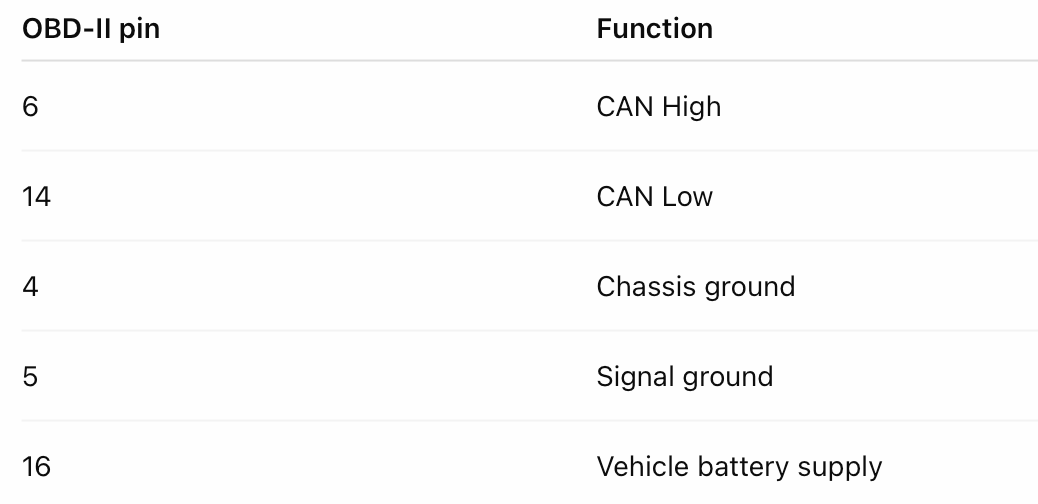
These assignments do not replace the wiring instructions for the interface board and cable. Check the connector orientation carefully, and follow the manufacturer’s guidance for power and ground connections.
The PiCAN2 can be connected through its DB9 connector or screw terminal.
When using an OBD-II-to-DB9 cable, verify that its wiring matches the PiCAN2 connector configuration. A DB9 connector does not establish a universal CAN pinout. The PiCAN2 solder jumpers must also be configured appropriately for the chosen cable.
An open-ended OBD-II cable offers another option, but every connection must be identified before wiring it to the terminal. Wire colors vary between cable manufacturers and should never be treated as a standard.
Leave the Vehicle’s Termination Intact
A properly installed vehicle CAN network already has its termination resistors. Connecting a diagnostic interface generally does not require an additional resistor.
The PiCAN2 termination resistor should therefore normally remain disabled when connecting to an existing vehicle network. Adding another termination resistor changes the electrical load and can interfere with communication.
This differs from a small bench network, where the developer must provide suitable termination at both physical ends of the bus.
Configuring the Raspberry Pi
The PiCAN2 uses an MCP2515 CAN controller connected to the Raspberry Pi through SPI. Linux accesses the controller through SocketCAN, which presents the CAN channel as a network interface, typically named can0.
Configuration involves enabling SPI and loading the appropriate device-tree overlay. The controller’s oscillator frequency and interrupt assignment must match the actual board.
Use the PiCAN2 documentation together with the instructions for the installed Raspberry Pi OS version. Older tutorials may refer to configuration file locations or overlay entries that differ from those used by newer releases. There is no benefit in copying an old configuration without checking whether it applies to the hardware and operating system.
Once the controller is recognized, the CAN interface must be configured with the correct bit rate. A rate of 500 kbit/s is common for CAN-based OBD-II, but it should not be assumed for every application.
For initial passive monitoring, listen-only mode is useful because it prevents the interface from transmitting onto the network. Active diagnostic requests require normal operating mode.
Recording Frames Is Only the First Step
Utilities such as candump, supplied with Linux CAN utilities, can display and record received frames. They are valuable for confirming that the interface works and for capturing timestamped traffic for later analysis.
However, candump does not automatically turn a raw CAN recording into an OBD-II report. Obtaining useful measurements requires software that generates diagnostic requests, identifies responses, and applies the correct decoding rules.
For example, standardized OBD-II engine speed is calculated from two response bytes:
Engine speed in rpm = (256 × A + B) / 4
The application must first identify a valid response to the engine-speed request before applying that formula. It must also handle unsupported parameters, response timeouts, and potentially responses from multiple control units. Longer diagnostic messages may require ISO-TP transport handling.
For a practical logger, decoded measurements should be saved with timestamps, parameter names, units, and an indication of missing or invalid responses.
Troubleshooting in a Logical Order
If no data appears, check the system one layer at a time:
Confirm that the vehicle supports CAN-based OBD-II.
Verify the cable wiring, board jumpers, and ground connection.
Check that the PiCAN2 termination resistor is disabled.
Confirm that Linux recognizes the CAN controller.
Verify the oscillator configuration and CAN bit rate.
Check whether the vehicle must be awake or the ignition switched on.
Establish whether passive traffic is available or diagnostic requests are required.
Confirm that the requested OBD-II parameters are supported.
A quiet diagnostic connector does not necessarily indicate defective hardware. The vehicle may be asleep, a gateway may restrict access, or the desired information may only be transmitted in response to a request.
A Raspberry Pi and PiCAN2 make a flexible platform for learning these distinctions. Start by establishing a reliable connection, then capture traffic, introduce supported diagnostic requests, and finally build the decoding and storage functions that turn individual responses into a useful vehicle data log.