


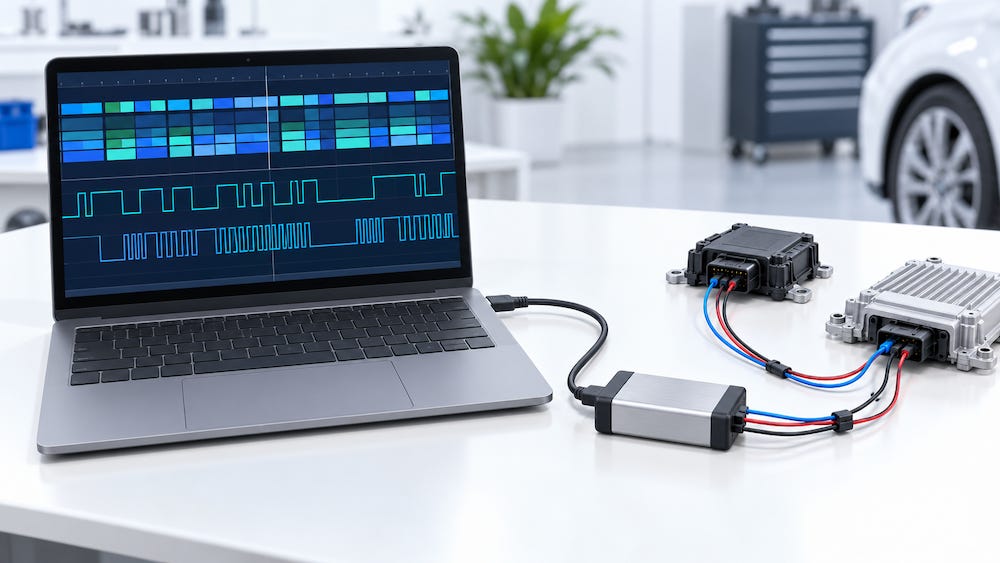
Monitoring LIN bus traffic from a Windows computer is straightforward when you have the right combination of hardware and software. Several manufacturers offer USB interfaces with graphical monitoring applications, while others provide more extensive tools for signal analysis, node simulation, and automated testing.
The challenge is choosing a package that matches the work. Displaying identifiers and data bytes requires relatively little. Decoding signals, investigating communication errors, simulating nodes, or recording several networks simultaneously calls for additional capabilities.
This overview examines the principal options identified through manufacturer documentation. It is a market survey rather than a hands-on product review. Software compatibility, licensing, and availability should be confirmed for the exact configuration being purchased.
Monitoring, Decoding, and Simulation
Before comparing products, it helps to distinguish three functions that often appear under the general description of “LIN analysis.”
Monitoring means observing frames on an operating network. The software displays the traffic and may record it for later examination.
Signal decoding translates data bytes into named values, such as a switch position, temperature, or actuator command. This requires the appropriate signal definitions, usually supplied in a LIN Description File, or LDF.
Simulation allows the interface to take an active role on the network. It may generate headers as the LIN master, respond as a slave, or execute a predefined communication schedule. Newer documentation may use the terms commander and responder for these roles.
These distinctions matter on the bench. Connecting a passive monitor to an isolated LIN slave will generally produce no communication because a master must generate the headers that prompt its responses.
An LDF also deserves attention. Capturing a frame does not automatically tell you what its bytes mean. Software with LDF support can interpret the signals when the correct description file is available.
PEAK PLIN-USB: A Practical Starting Point
For monitoring a single LIN network, the PEAK PLIN-USB is a useful starting point.
It includes PLIN-View Pro, a Windows application that displays incoming frames, records traces, and provides symbolic interpretation using LDF files. The software also handles schedule tables and records events such as bus sleep, wake-up, and overruns.
The hardware supports LIN specifications through version 2.2, bit rates from 1 to 20 kbit/s, and master or slave operation. Automatic recognition of the bit rate, frame length, and checksum type can simplify the initial setup.
For developers who want to build their own application, PEAK supplies the PLIN programming interface. PLIN-View Pro also supports scripting.
One practical detail is easy to overlook: although the adapter electronics receive power through USB, the LIN transceiver requires a supply through the bus connector. An unpowered bench network therefore needs the appropriate supply and cabling.
My recommendation would be to evaluate this package first when the main requirements are live frame display, LDF decoding, and traffic recording.
PEAK PCAN-USB Pro FD: CAN and LIN in One Interface
The PCAN-USB Pro FD extends the concept to combined CAN and LIN work.
It provides two CAN/CAN FD channels and two LIN channels. Suitable breakout cables allow access to all four networks.
The included Windows applications are:
PCAN-View for CAN traffic.
PLIN-View Pro for LIN traffic.
This makes the interface worth considering when a project involves a CAN network and its associated LIN devices. For example, a controller may communicate with the main system over CAN while operating local switches or actuators over LIN.
The supplied monitors are separate applications, so anyone requiring a unified view of activity across both buses should examine the software workflow before purchasing.
Also check the exact product name. The PCAN-USB Pro FD is the combined interface discussed here; the presence of LIN software in an installer does not mean every PEAK CAN adapter has LIN hardware.
Lipowsky Baby-LIN: Monitoring with Room to Grow
Lipowsky Baby-LIN-II is particularly interesting when monitoring is likely to lead to simulation and automated testing.
The package includes the LINWorks software suite, drivers, examples, and documentation. Its documented functions include real-time frame access, bus monitoring, logging, master and slave simulation, and diagnostic transport support.
It can also execute programmable command sequences in standalone operation. This is useful when a test must run repeatedly without relying on manual interaction with a Windows application.
A DLL provides access from custom programs, including C/C++, .NET, Python, and LabVIEW.
Lipowsky uses an SDF configuration format in its workflow. When evaluating the product, ask how the supplied software imports your LDF and turns it into a usable configuration.
Other Baby-LIN models add features such as displays, keypads, I/O, and additional communication interfaces. Those features become relevant when the device must operate as part of a test fixture or standalone system.
For ordinary PC monitoring, Baby-LIN-II is the logical model to examine first. For repeatable bench testing, the wider family deserves a closer look.
Kvaser Hybrid: Configurable CAN and LIN Channels
The Kvaser Hybrid CAN/LIN offers a configurable channel that can operate as CAN, CAN FD, or LIN.
The word configurable is important. The single-channel model provides one selected bus connection at a time. It cannot monitor CAN and LIN simultaneously.
The Hybrid 2xCAN/LIN provides two independently configurable channels. It can connect to two CAN networks, two LIN networks, or one of each.
Kvaser supplies CanKing 7, its free CAN and LIN analysis software, along with programming interfaces for custom applications. Use the current software generation when evaluating LIN functionality; older CanKing listings describe a CAN monitor.
For applications requiring LDF signal interpretation or convenient schedule editing, request a demonstration of those specific functions in the supplied GUI. General LIN support does not establish that every desired analysis feature is available.
The Hybrid Pro models add capabilities such as clock synchronization and other advanced functions. Check which features apply to LIN: some advertised functions specifically concern CAN operation.
Kvaser is a worthwhile option for developers who value configurable channels and access through software APIs.
Microchip LIN Serial Analyzer: An Established Development Tool
The Microchip LIN Serial Analyzer, part number APGDT001, provides a USB interface and graphical software for monitoring traffic, sending messages, checking errors, and filtering messages.
It remains an option to investigate for basic LIN development. However, the listed version 3.0.0 software download dates from 2016.
Before purchasing, confirm compatibility with your Windows version, the required runtime and drivers, current availability, and the available export functions. The reviewed overview did not establish native LDF signal decoding.
An older tool may still perform the required work well, but installation and support are part of the purchase decision.
Vector CANalyzer and CANoe: Extensive Analysis and Testing
Vector provides a more extensive environment through CANalyzer and CANoe, used with compatible LIN hardware.
CANalyzer is relevant for network analysis, symbolic signal display, diagnostics, and controlled message stimulation. CANoe extends the scope into simulation and automated testing of ECUs and distributed systems.
These products use configurable software editions and options. A hardware purchase should therefore be evaluated together with the required LIN capabilities and software license.
Vector is particularly relevant when LIN forms part of a larger automotive development or validation project, or when a team already uses its tools.
For someone who simply wants to inspect a few LIN frames, the setup and licensing may exceed the requirement. Ask for a complete quotation covering hardware, software options, and support.
Windows compatibility also depends on the release and processor architecture. Check the requirements for the exact version being purchased.
Ixxat: Combined Bus Analysis with Licensed Software
Ixxat offers automotive USB interfaces with LIN capability, including the USB-to-CAN FD automotive model.
The hardware supports LIN master and slave operation. Its more extensive analysis environment, canAnalyser 3, provides functions such as tracing, filtering, signal interpretation, and LDF database import.
The software package needs careful attention. The included canAnalyser Mini is described as a CAN monitor. Its inclusion should not be taken as confirmation that a complete LIN monitoring application is supplied.
Request a quotation identifying the exact software edition and LIN functions. This is especially worthwhile if Ixxat hardware is already part of your development setup.
NI USB-8506: LIN in a Measurement System
The NI USB-8506 is available with one or two LIN ports and works with the NI-XNET driver environment.
It is intended for applications involving monitoring, logging, and automated control, particularly where LIN data must be integrated with other measurements.
The NI-XNET Bus Monitor provides a way to inspect traffic. However, NI documents that LIN transmission is not supported in that monitor and directs users toward an application example for transmitting.
This illustrates a useful buying principle: the hardware may support a function that the basic monitoring GUI does not expose.
NI is a strong candidate when the project already uses LabVIEW, NI-XNET, or NI measurement hardware. For an independent LIN monitor, compare the complete software and development requirements with the simpler packages.
CSS Electronics CANedge: Recording Without a Connected PC
The CANedge family addresses a different need: recording traffic without keeping a Windows computer connected.
CANedge devices store CAN and LIN frames on an SD card in MF4 files. With appropriate cabling, they can record up to two CAN and two LIN networks simultaneously. Some models add wireless transfer.
The recorded files can then be examined on a Windows computer using suitable analysis software, including asammdf. Signal interpretation requires the appropriate LDF or other supported database.
This workflow is particularly useful for intermittent faults or long recordings in an operating machine or vehicle.
Before selecting a logger, verify its current support for LIN errors and special frame types. A product’s CAN error-recording capability does not automatically establish equivalent LIN coverage.
Additional Options for Experimentation and Troubleshooting
Two further interface options are worth investigating.
BUSMUST with BUSMASTER provides a documented workflow for LIN message display, signal watching, logging, transmission, and schedule configuration. Confirm the supported hardware, driver, and BUSMASTER build as a complete package.
The uCAN USB LIN Converter provides a compact interface with monitor, master, and slave modes. Its uCCBViewer application offers frame access and scheduling functions, while a virtual serial interface supports custom tools. Verify the firmware, supported bit rates, Windows setup, and seller before ordering.
A logic analyzer offers another approach. Saleae Logic includes LIN protocol decoding and allows examination of the underlying timing alongside decoded frame fields.
That can help investigate malformed communication or timing problems. Use a suitable LIN transceiver output or properly rated electrical interface when connecting the analyzer.
A logic analyzer or oscilloscope serves a different purpose from a LIN node simulator. Waveform inspection is valuable, but it should not be assumed to include LDF signal interpretation or schedule generation.
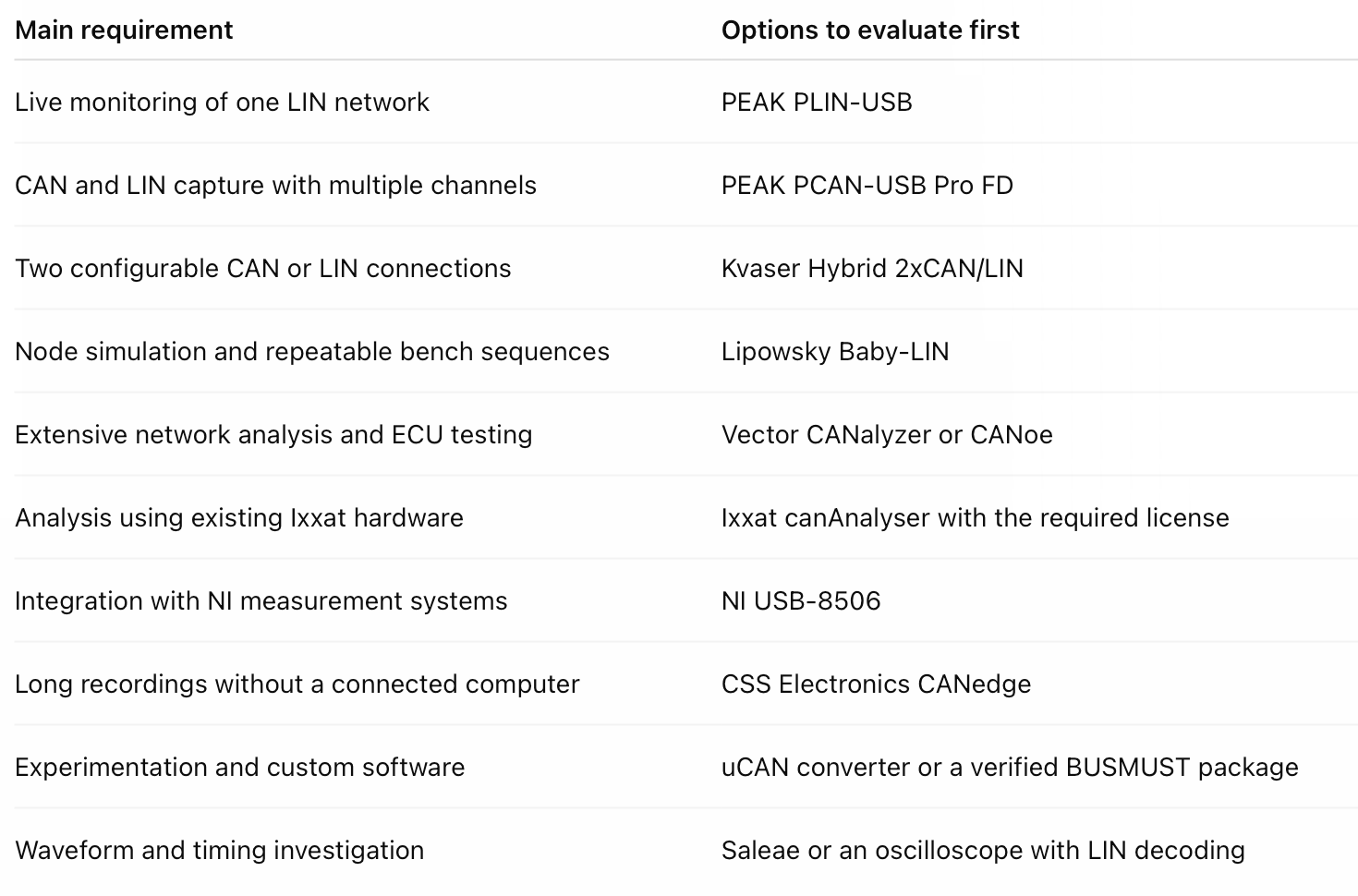
Which Option Fits the Job?
What I Would Check Before Buying
My first questions would concern the software supplied with the interface:
Can it monitor the existing network without transmitting?
Does it import an LDF and display named, scaled signals?
Which communication errors does it detect and record?
Can it save timestamped traffic in a format usable outside the application?
Does simulation require an additional license or custom programming?
Are the software and drivers supported on the intended Windows computer?
Then I would check the complete hardware package: bus cables, breakout connectors, supply requirements, and isolation.
For straightforward Windows monitoring, I would begin with PLIN-USB and PLIN-View Pro. If the work includes CAN and LIN simultaneously, I would compare PCAN-USB Pro FD and a suitable Kvaser Hybrid model. If node simulation and automated bench sequences are central to the project, I would give Baby-LIN particular attention.
The useful comparison is the complete working package: interface, software functions, licensing, and connections. That is what determines how quickly you can move from plugging in the device to understanding the traffic.
Product information reviewed in October 2026. This overview is based on manufacturer documentation; it does not imply hands-on testing or endorsement of every listed product.