When a customer asked me to develop a controller for a Thomson Electrak HD linear actuator, the task sounded straightforward: start, stop, extend, retract, and adjust the speed. The actuator supported SAE J1939 communication, and I had plenty of experience with CAN Bus. I expected the communication software to be the familiar part of the project.
As it turned out, sending the commands was relatively easy. Understanding how the actuator behaved under different operating conditions took considerably more work.
That experience became the foundation for my publication, Linear Actuator Motion Control per CAN Bus. In it, I documented the hardware, software, testing process, and workarounds I developed, together with free example source code.
Keeping the Communication Simple
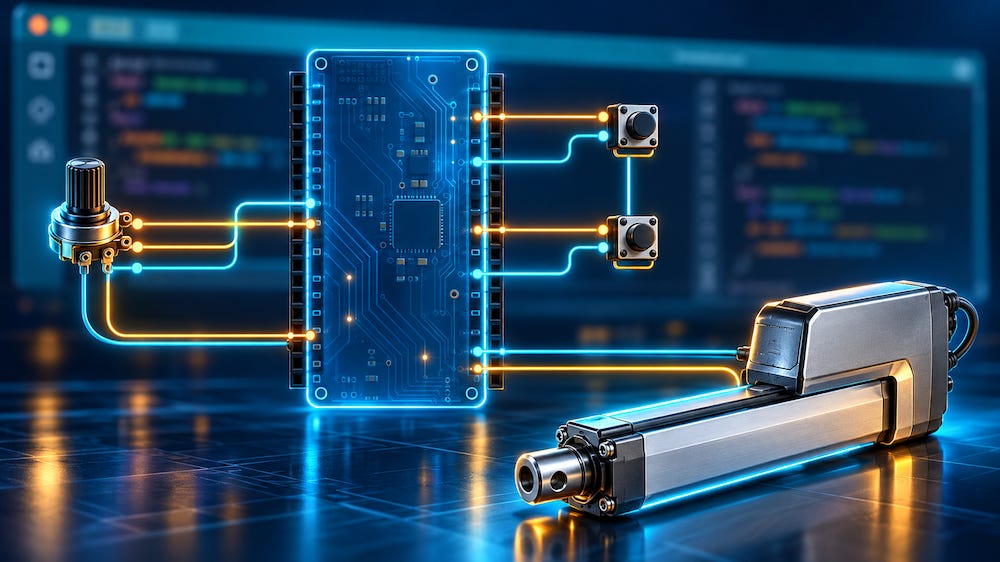
For this application, I chose an Arduino Due with a CAN Bus interface and used the Arduino IDE for software development. Switches provided the start, stop, and direction inputs, while a potentiometer controlled the requested speed.
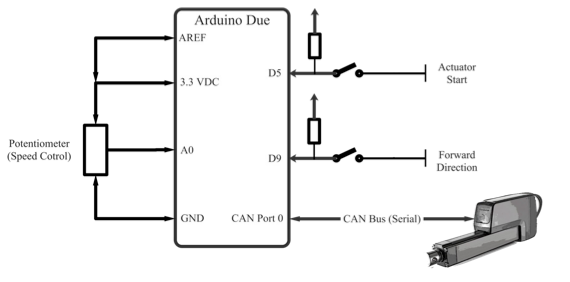
One useful discovery was that the actuator’s basic motion functions did not require me to implement a complete SAE J1939 protocol stack. I could control it by transmitting the appropriate CAN messages with 29-bit identifiers and interpreting the feedback.
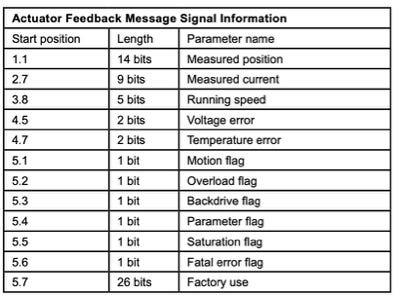
That simplified the software considerably. My program built the Actuator Control Message, transmitted the requested motion parameters, and read the Actuator Feedback Message for position, current, motion status, and error information.

The real challenge emerged when I moved beyond basic movement and started testing startup behavior, low-speed operation, and end-position detection.
When the Manual Does Not Tell the Whole Story
During development, I encountered behavior that the manufacturer’s documentation did not explain sufficiently for my application.
For example, the actuator could report that it was not moving immediately after waking from sleep. That sounds harmless, but my controller needed to distinguish between an actuator that had finished moving and one that had not yet started. Without that distinction, the software could interpret startup feedback as an indication that an end position had already been reached.
I also observed an overload flag during power-up, even though the actuator was stationary and operating without a mechanical load.
My first instinct in situations like these is to check my own software. However, repeated tests and analysis of the CAN traffic showed that I needed to account for the actuator’s startup behavior explicitly.
I developed a timed startup sequence that allowed the actuator to wake up, handled the initial feedback, and cleared the error condition before normal operation continued. I also combined position information with the motion status to improve end-position detection.
These details added more code than I had originally expected, but they made the controller behave consistently in my tests.
Solving the Low-Speed Starting Problem
Another challenge appeared at low speed. Under certain conditions, particularly after changing direction, the actuator reported a fatal error instead of starting.
What made this interesting was that the actuator could run at a low setting after starting at a higher one. The difficulty was getting it moving at the requested low setting.
My workaround was to apply a brief higher-duty-cycle command at startup, then return to the setting selected by the potentiometer. This provided the initial push needed to begin movement.
I documented the reasoning and implementation in the publication, including the parameters used in my example. Those settings need to be evaluated for the individual actuator, load, and application; they are part of the development process.
Testing the Network Matters Too
The project also reminded me how much the surrounding network can influence an otherwise simple motion-control task.
In my tests, multiple actuators on the same CAN network kept one another awake through their feedback traffic. That prevented the expected sleep behavior and became an important consideration for battery-powered installations.
I also examined CAN termination, communication checks, and the need to stop unnecessary command traffic once the actuator reached its destination.
A CAN monitoring interface proved invaluable throughout this work. Watching the actual messages helped me separate software mistakes from device behavior and understand why a seemingly reasonable control sequence did not always produce the expected result.
Everything Documented, with Free Source Code
After receiving questions from other engineers working with these actuators, I decided to turn my development notes into a practical guide.
Linear Actuator Motion Control per CAN Bus explains the hardware connections, control-message construction, feedback decoding, timing, startup handling, low-speed workaround, and end-position detection. It also records the unexpected behavior I encountered and how I addressed it.
The free source code comes in two versions. The basic version demonstrates start, stop, direction, and speed control. The extended version adds the startup handling, motion-end detection, communication checks, and workarounds developed during testing.
The examples provide a starting point for your own development. They do not reproduce the customer’s complete customized system or implement synchronized motion between multiple actuators.
You can purchase Linear Actuator Motion Control per CAN Bus as either an ebook or a PDF file. The accompanying example source code is available free of charge.
My aim was to give other developers the information I would have appreciated at the beginning: a clear explanation of the control method, working code to study, and an honest account of the details that took time to uncover.
Get Your Copy—Available as Ebook or Kindle